Microsoft Intune Autopilot Event Monitor Reference Guide
Microsoft Intune Autopilot Event Monitor
Monitors Windows Autopilot devices using Microsoft Intune.
Overview
The Microsoft Intune Autopilot Event Monitor keeps track of devices in Windows Autopilot and alerts about their presence, absence, enrollment status, and more.
Use Cases
- Ensuring each device is enrolled and that check-ins occur regularly
Monitoring Options
This event monitor provides the following options:
Alert with [Info/Warning/Error/Critical] if Azure cannot be contacted
This alert will be triggered if the event monitor cannot contact Microsoft Azure.
Alert with [Info/Warning/Error/Critical] if a new device is found
Use this option to receive an alert if a new devices is found.
Alert with [Info/Warning/Error/Critical] if a device is removed
Enable this option to receive an alert of your choice of severity if a device is removed.
Alert with [Info/Warning/Error/Critical] if a device is unassigned
Use this option to get alerted if a device is not assigned to a user.
Alert with [Info/Warning/Error/Critical] if a device is reassigned
Enable this option to receive an alert if a device is reassigned to a different user.
Alert with [Info/Warning/Error/Critical] if a device is not enrolled (has never contacted Intune)
Use this option to get alerted if a device has never contacted Microsoft Intune.
Alert with [Info/Warning/Error/Critical] if a device has failed to enroll
Use this option to get alerted about devices that have failed to enroll.
Alert if a specified amount of time has passed since the last device check-in
Use this option to get a custom alert if more than the time you specify has passed since a device checked in.
Include a table of devices [before all/after all] event text
This option and the following sub-options will include a custom table in the event text generated each time this event monitor runs.
Include all devices
Check this box to include all devices managed by Windows Autopilot.
Include unassigned devices
This and the following boxes can be mixed and matched to filter the devices that are shown in the table. Check this box to include devices that are not assigned to a user.
Include devices that haven't contacted Intune in the last 30 days
Check this box to include devices that have had no contact with Intune in the past 30 days.
Include devices that have failed to enroll
Enable this option to include devices that have failed to enroll with Intune.
Include devices that are not enrolled (have never contacted Intune)
Use this option to include devices that have never contacted Intune.
Include IDs in the table
Check this box to include IDs in the table output.
Include IDs in the event text
Check this box to include IDs in the event text.
Devices to ignore
Enter a list of devices you do not want to monitor, separating each new entry onto a new line.
Authentication and Security
The account used to authenticate must have the following permissions at the application level:
- User.Read
- Organization.Read.All
- DeviceManagementServiceConfig.Read.All
- DeviceManagementConfiguration.Read.All
Protocols
Data Points
This event monitor generates the following data points:
| Data Point | Description |
|---|---|
| Assigned Autopilot Devices | Number of assigned Autopilot devices. |
| Assigned Autopilot Devices % | Percentage of detected devices that are assigned. |
| Autopilot Devices | Total number of autopilot devices. |
| Unassigned Autopilot Devices | Number of assigned Autopilot devices. |
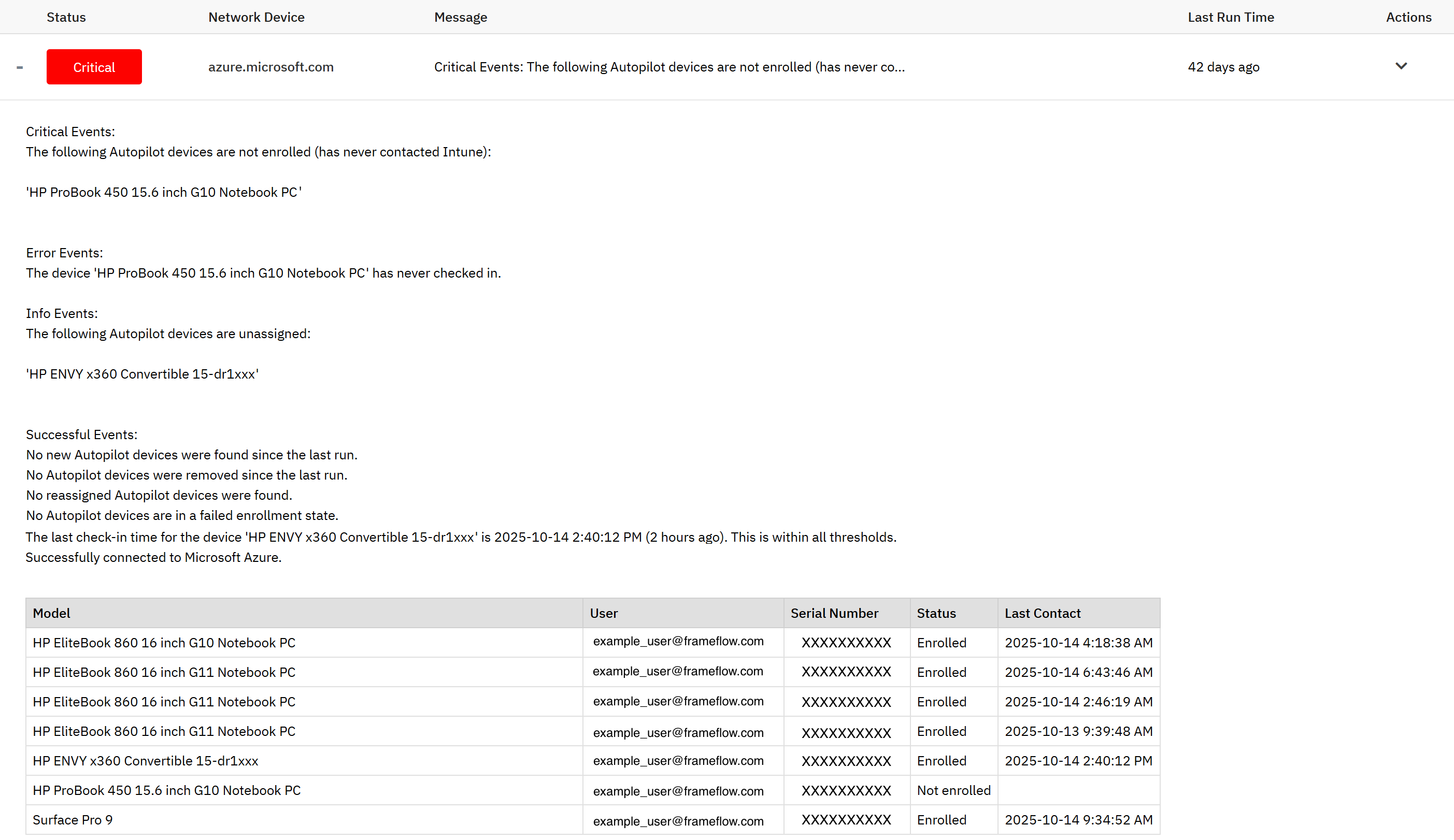
Sample Output
Comments
Add a comment