Entra ID Users and Devices Event Monitor Reference Guide
Entra ID User and Devices Event Monitor
Monitors changes in Entra ID and alerts about new, modified, and deleted users.
Overview
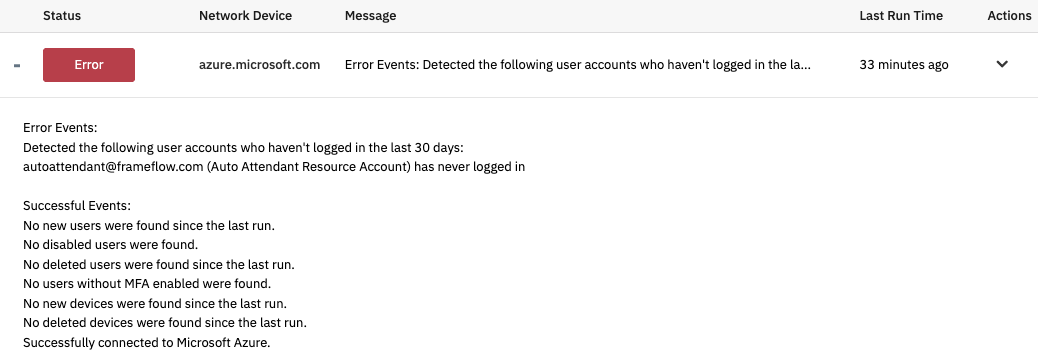
The Entra ID User and Devices Event Monitor monitors your Entra ID users and sends alerts if users are modified, deleted, or new since the last time the event monitor checked.
Use Cases
- Receiving alerts about modified, deleted, and new users
- Confirming group membership of users
Monitoring Options
This event monitor provides the following options:
Alert with [Info/Warning/Error/Critical] if the device cannot be contacted
This option will send you an alert if the device cannot be contacted.
Alert with [Info/Warning/Error/Critical] if user accounts are newly created
Use this option to receive an alert if the event monitor detects user accounts that have been newly created.
Alert with [Info/Warning/Error/Critical] if user accounts are deleted
This option will send an alert of your choice if user accounts have been deleted.
Alert with [Info/Warning/Error/Critical] if user accounts have not logged in for [#] days
Use this option to receive an alert if user accounts have not logged in for a specified number of days.
Alert with [Info/Warning/Error/Critical] if user accounts are disabled
Use this option to get alerted if user accounts are disabled.
Alert with [Info/Warning/Error/Critical] if user accounts do not have MFA enabled
Use this option to receive an alert if user accounts do not have multi-factor authentication enabled.
Only check users in the following group
Enable this option to check only users in the group you specify.
User accounts to ignore
Enter the names of the accounts to ignore, separated by commas. Note that this feature does not apply to deleted accounts.
Ignore disabled user accounts
Check this box to ignore disabled user accounts.
Ignore guest accounts
Use this filter option to ignore Entra ID guest accounts.
Ignore member accounts
Use this option to ignore member accounts in Entra ID.
Ignore accounts that have never logged in
This option lets you ignore user accounts that have never logged in.
Group name
Enter a group ID that will be checked. This option allows you to be notified whenever changes are made to specific group in Microsoft Entra.
Alert with [Info/Warning/Error/Critical] if members are added
Use this option to receive an alert of your choice if members have been added since the event monitor last ran.
Alert with [Info/Warning/Error/Critical] if members are removed
This option will send an alert of your choice if members are removed from Entra ID.
List the first [#] detected group members
Enable this option to include a list of detected group members in the event text this event monitor generates. Enter the number of group members you want displayed.
Alert with [Info/Warning/Error/Critical] if computers are added
This option will send you an alert of your choice if computers have been added since the last time the event monitor checked.
Alert with [Info/Warning/Error/Critical] if computers are deleted
Enable this option to receive an alert of your choice if computers have been deleted since the last time the event monitor ran.
Authentication and Security
The account used to authenticate must have User.Read.All, Directory.Read.All, Group.Read.All, Device.Read.All, GroupMember.Read.All, and AuditLog.Read.All at the application level.
Protocols
Data Points
This event monitor generates the following data points:
| Data Point | Description |
|---|---|
| Deleted Devices | Number of deleted devices. |
| Deleted Users | Number of deleted users. |
| Disabled Users | Number of disabled user accounts. |
| New Devices | Number of new devices since last check. |
| New Users | Number of new users since last check. |
| Stale Accounts | Number of stale accounts |
| Users Without MFA | Number of user accounts without multi-factor auth enabled. |
Sample Output
Comments
Add a comment