App Version Event Monitor Reference Guide
App Version Event Monitor
Checks the versions of the applications detected on devices.
Overview
The App Version Event Monitor checks app versions on connected devices and sends alerts if applications are out of date.
Use Cases
- Getting notified when applications need updates
- Keeping a list of applications that are out-of-date
Monitoring Options
This event monitor provides the following options:
Alert based on the number of out-of-date apps
This option will send an alert of your choice if the event monitor detects any applications that need an update.
Include a table of all out-of-date apps [before all/after all] event text
Use this option to generate a table of all out-of-date apps either before or after the event text the event monitor outputs each time it runs.
Only check the following apps
Enable this option to enter specific applications for the monitor to check. The apps that aren't listed here will be ignored. Specify multiple strings by adding them each on a new line. You can use "*" as a wildcard to match many applications, like "Microsoft*".
Ignore the following apps
In this field, enter a list of apps that you want the event monitor to ignore. Specify multiple strings by adding them each on a new line. You can use "*" as a wildcard to match many applications, like "Microsoft*".
Authentication and Security
This event monitor runs based on device tags, so no authentication profile is needed.
Data Points
This event monitor generates the following data points:
| Data Point | Description |
|---|---|
| Out of date apps | The number of applications that need updates. |
Tutorial
To view the tutorial for this event monitor, click here.
Sample Output
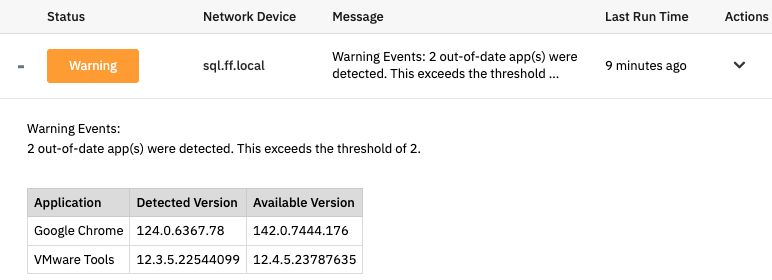
Comments
Add a comment